11th March 2024
I've had a couple of reports from users who have found that the search results list mysteriously disappears; the results are still shown by markers on the map, but the list is entirely blank.
It seems that the cause of this is something to do with the font and screen sizes. Certain combinations of text size, display zoom (both settings in the main Settings app, under "Display & Brightness") and device screen size cause the search results list to disappear.
I will fix this eventually, but in the meantime if you see this problem note that you can probably fix it by changing one of those settings. Do please get in touch if you are affected by this, as it will be useful to know exactly which devices and settings trigger the problem.
1st March 2024
Prices for paid map in-app purchases will be increasing by approximately 5% on 1st April. This is due to increased royalty charges from Ordnance Survey.
If you have been contemplating any map purchases, now might be the right time!
6th February 2024
This is a minor update to fix bugs.
If you've experienced any obscure bugs with previous versions, please update and let me know if this version resolves any of them.
16th January 2024
This is a minor update to fix bugs.
If you've experienced any obscure bugs with previous versions, please update and let me know if this version resolves any of them.
21st December 2023
This is a minor update primarily to restore functionality on iOS 12.
There are also some further bug fixes related to "Restore Purchases" and paid map purchases. Please let me know if you have any feedback about this, or anything else.
29th November 2023
An update to the app is now available. This principally a bug-fix update, though it also includes a new 1:1,000,000 map, new search data, and new magnetic deviation data.
The bug fixes include changes to the "Restore Purchases" function. Please let me know if you see any improvements - and especially if you see any new misbehaviour - related to this, or anything else.
Updated: Important: This update has inadvertently broken compatibility with iOS 12, for old devices that are stuck on that iOS version. I am investigating. If you have an old device running iOS 12, don't upgrade, and turn off automatic upates. Sorry for the inconvenience.
28th June 2023
Apple have now approved the in-app purchases for the updated 1:25,000 maps. Thanks for your patience while the maps were unavailable.
Unlike the paid 1:50,000 and 1:10,000 maps, the in-app purchases for the paid 1:25,000 maps do not include updates to future versions of the maps. This is due to differences in the licensing terms from Ordnance Survey. As a consequence of this:
Note that in many cases the differences between the old and new versions will be very minor, or possibly non-existent. Last time I updated these maps I prepared a set of images to show the differences, but I don't believe many people ever looked at them; let me know if you'd like me to do the same this time.
Please let me know if you have any difficulties with the new maps (or any other feedback); this update process has been more complicated than usual and errors are quite possible.
26th June 2023
The paid 1:25,000 maps will be updated soon.
Unlike the paid 1:50,000 and 1:10,000 maps, the in-app purchases for the paid 1:25,000 maps do not include updates to future versions of the maps. This is due to differences in the licensing terms from Ordnance Survey.
If you are considering purchasing paid 1:25,000 maps soon, there are a couple of things to consider:
In most cases, the changes to the maps will be quite minor - but if you are considering investing in the large region purchases, I would advise waiting for a few days.
Do get in touch if you have any questions about this.
Update 27th June: The old versions of these in-app purchases have now been removed from sale; new versions will be shown in the app once they have been approved by Apple.
24th June 2023
In-app purchase prices for the paid maps are calculated based on the area, in square kilometres, being purchased. Previously the App Store allowed only a limited number of "price tiers", and these prices were typically rounded to the nearest £x.99.
Apple recently added more flexibility to App Store pricing and it's now possible to set prices to almost any £x.x9, e.g. £0.59, £3.49, etc. To take advantage of this I have today recalculated the prices for the paid 1:50,000 and 1:10,000 maps.
Some of the new prices are lower than the old prices and some are higher; overall the effect should be neutral, and the prices are now fairer.
21st June 2023
An updated version of the paid 1:50,000 maps is now available. These use the latest maps from Ordnance Survey.
Your app should notify you of the new maps soon, and you can then update areas by selecting 'Update' from the Map Management screen and selecting the area.
Please let me know if you spot any problems.
20th June 2023
An updated version of the paid 1:10,000 city maps is now available. These use the latest maps from Ordnance Survey.
Your app should notify you of the new maps soon, and you can then update areas by selecting 'Update' from the Map Management screen and selecting the area.
Please let me know if you spot any problems.
19th June 2023
An updated version of the free 1:25,000 maps is now available. These use the latest maps from Ordnance Survey and updated footpath data from OpenStreetMap.
Your app should notify you of the new maps soon, and you can then update areas by selecting 'Update' from the Map Management screen and selecting the area.
Please let me know if you spot any problems.
9th June 2023
It seems that paid maps are currently not working on macOS. This is due to a macOS bug; for some reason it fails to save the app store receipt for the in-app purchases, so the app doesn't know what you have bought. This worked fine in the past.
Apple say that this will be fixed in a "future OS update"; I hope that means a macOS 13.n point release, and that we don't have to wait for macOS 14 to be released in the autumn. There is not much that we can do in the meantime; I guess there is a small chance that I will find a work-around but it's unlikely.
This is not the first time that the in-app purchase system has stopped working on macOS due to macOS bugs. Regrettably I have to advise that using paid maps on macOS must be considered "at your own risk".
6th May 2023
An updated version of the free 1:10,000 maps is now available. These use the latest maps from Ordnance Survey and updated footpath data from OpenStreetMap.
Your app should notify you of the new maps soon, and you can then update areas by selecting 'Update' from the Map Management screen and selecting the area.
Please let me know if you spot any problems.
14th April 2023
Today I've launched a new map app for New Zealand, using topographic maps from Land Information New Zealand. It has a 3D mode similar to UK Map, and also has satellite imagery at 20m-per-pixel resolution. Any UK Map users who are going to New Zealand should definitely check it out! App Website
13th February 2023
Apple are changing the App Store price tiers for the UK today, to account for the fall in the value of the pound against the US dollar.
This will not affect the price of UK Map, including the paid map in-app purchases, because I have made changes in the opposite direction - but there may be some brief glitches as this happens. You might prefer to avoid making any expensive purchases today, to avoid any confusion.
Customers outside the UK will generally see prices fall slightly as a result of these changes.
14th July 2022
An updated version of the paid 1:10,000 city maps is now available. These use the latest maps from Ordnance Survey.
Your app should notify you of the new maps soon, and you can then update areas by selecting 'Update' from the Map Management screen and selecting the area.
Please let me know if you spot any problems.
14th July 2022
An updated version of the paid 1:50,000 maps is now available. These use the latest maps from Ordnance Survey.
Generally the changes are minor in most places, with many tiles not changed at all, so I do not recommend updating areas unless you believe something significant has changed there.
The downloads in this update use a new file format - provided you are using a sufficiently-new version of the app - which is a little smaller than the old format. This should make downloads faster and mean the maps use less storage space on your device. (The difference is less pronounced for these maps than for the free maps, for some reason.)
Your app should notify you of the new maps soon, and you can then update areas by selecting 'Update' from the Map Management screen and selecting the area.
Please let me know if you spot any problems.
3rd July 2022
A couple of users have reported issues when trying to update to the new free maps - the app crashes when they start the update.
I believe I have identified the cause and have made a temporary change on the server which should resolve it for now; I am working on a permanent fix. Please get in touch if you continue to experience any crashes while updating maps.
Note that deleting and re-installing the maps (note maps, not the app) would also avoid the problem.
Sorry for the inconvenience.
Update 4th July: I've fixed a bug on the server which I believe should resolve this problem. If you continue to see crashes while updating maps, please get in touch.
22nd June 2022
An updated version of the free 1:10,000 maps is now available. These use the latest maps from Ordnance Survey and updated footpath data from OpenStreetMap.
The downloads in this update use a new file format - provided you are using a sufficiently-new version of the app - which is approximately 30% smaller than the old format. This should make downloads faster and mean the maps use less storage space on your device.
Your app should notify you of the new maps soon, and you can then update areas by selecting 'Update' from the Map Management screen and selecting the area.
Please let me know if you spot any problems.
20th June 2022
An updated version of the free 1:25,000 maps is now available. These use the latest maps from Ordnance Survey and updated footpath data from OpenStreetMap.
The downloads in this update use a new file format - provided you are using a sufficiently-new version of the app - which is approximately 30% smaller than the old format. This should make downloads faster and mean the maps use less storage space on your device.
Your app should notify you of the new maps soon, and you can then update areas by selecting 'Update' from the Map Management screen and selecting the area.
Please let me know if you spot any problems.
6th April 2022
An update to the app is now available. This is a minor update to fix bugs.
As ever, if you have any problems with the app after upgrading, please get in touch.
Update: One user encountered a problem with the "Restore Purchases" button after this update, seeing the message "Error downloading map authorisation". I believe that the same message could also be shown after making an in-app purchase. Affected users will be those who have used iCloud backup/restore or similar to transfer the app to new hardware since version 4.5 was released in March.
I have now made a change on the server which should mean that you will see this error message at most once, i.e. if you see the message then you should be able to touch "Restore Purchases" again and it will now complete correctly.
Sorry for the inconvenience. Please don't hesitate to get in touch if you encounter this problem, or any other issues.
11th March 2022
I am aware that there is currently a problem downloading detailed maps. I believe this is probably related to a security update on the server and I am investigating further. Hopefully it will be resolved soon, please check back here for updates. Sorry for the inconvenience.
Update 17th March: I believe that the server is now working reliably. Please don't hesitate to get in touch if you ever have any problems downloading detailed maps. The main issue at the weekend was that the system had not failed over to the backup server as it should have done. I hope that that and the underlying problem - a misconfiguration - are now resolved.
7th March 2022
This afternoon I saw this popup from Apple after I did a test in-app purchase in UK Map:
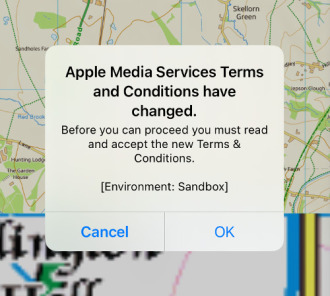
Tapping OK presented another larger popup with the text of the terms:
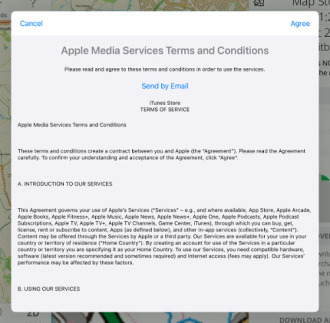
But at this point, the Agree button at the top right was inactive making it impossible to do anything other than cancel the the purchase. Trying to purchase again shows the popup again.
What I don't know is whether this is affecting all users of UK Map, or whether it is specific to the test environment that I use while developing the app. If you are seeing something like this which is blocking you from making in-app purchases, please get in touch!
I eventually discovered that, on this iPad, if I rotated the device from landscape to portrait then the Agree button would become active. (Bizarre, right?). Again I have no idea if the same trick would work for anyone else.
1st March 2022
An update to the app is now available. This is mostly a minor update:
I have also made some changed to the server infrastructure. If you have any problems with map downloads after upgrading, please get in touch.
4th February 2022
Since Ordnance Survey doesn't include any free footpath data in its OpenData offering, UK Map's free maps superimpose paths using data from OpenStreetMap. Although this works well it's not perfect; there are still gaps where the OpenStreetMap surveyors have yet to go.
An alternative source of free footpath data is the local highway authorities, who are responsible for the legal record public rights of way. Much of this data has been collected at the rowmaps website.
I have recently been comparing these two data sources, and my conclusion is that for the time being it is best to stick with the OpenStreetMap paths - but I would value comments from users about what you would prefer.
Please visit this web page, which includes screenshots comparing the current OpenStreetMap paths, the paths from rowmaps, and the paid Ordnance Survey maps. It also has a download which you may be able to use to evaluate the rowmaps data for your area.
I look forward to your feedback.
13th October 2021
I will be carrying out maintenance work on the servers that provide map downloads and this website over the next few days. If all goes according to plan, backup systems will ensure that downtimes are brief. But things don't always go according to plan: please excuse any problems, and sorry for the inconvenience.
Updated 14th October:The work is now complete; please let me know if you encounter any problems with map downloads or this website.
4th August 2021
I'm in the UK, Ordnance Survey is in the UK, and 95% of my customers are in the UK - so I set prices in pounds. But Apple is not here, and the App Store's underlying currency is the US dollar.
A consequence of this is that from time to time, as exchange rates move, Apple changes App Store prices for non-dollar purchases. Each time this happens, I have to make an adjustment in the opposite direction so that prices for customers in the UK remain the same.
Apple have just announced such a change, which will come into effect "in the next few days".
Since they don't say exactly when the changes will happen, I don't know exactly when to make my opposite-direction changes. As a result there is likely to be a glitch in the price of the app and some of the in-app purchases lasting for a day or so.
The only case where this is a real concern is with the expensive 1:25,000 large region paid maps, where the prices might temporarily be as much as £20 too high. The correct prices for these purchases are currently £99 or £109; if you see higher prices, you might prefer to wait for a few days and look again.
27th July 2021
It's very important that UK Map users are able to download maps whenever they want to. Maintaining a reliable system of servers to make this possible is a large part of my work, and over the decade that this app has existed I have made three major upgrades to the server infrastructure.
An important rule-of-thumb is that as no single part of the system can ever be 100% reliable, everything must have a backup. In practice, though, many server systems are very close to 100% reliable and those backup systems never actually get activated - so when something does eventually go wrong, we discover the hard way that the backup system was not working.
I've recently made some changes to address this, by sending a small fraction of map download requests to the backup system even when the main server is believed to be functioning correctly. Hopefully this will be enough for me to discover whether the backup system is always ready for action. Users shouldn't notice any changes as a result of this.
If you do ever experience any problems with map downloads you are welcome to get in touch. In most cases, however, the problem turns out to be a temporary issue somewhere in the network between us.
4th July 2021
Updated versions of the paid 1:50,000 and 1:10,000 maps are now available, using the latest data from Ordnance Survey.
Generally the changes are minor in most places, so I do not recommend updating areas unless you believe something significant has changed there.
Your app should notify you of the new maps soon, and you can then update areas by selecting 'Update' from the Map Management screen and selecting the area. These updates are available to everyone who has purchased the corresponding regions.
Please let me know if you spot any problems.
21st June 2021
An update to the app is now available, which offers new versions of the paid 1:25,000 maps.
Unlike the other map types, users who have previously purchased 1:25,000 maps do not get free access to the updated maps. This is due to a difference in the licence terms from Ordnance Survey. So going forward:
In many cases the differences between the 2019 and 2021 maps will be very minor and sometimes non-existent; I anticipate that few users will want to pay again for the new versions. To help you decide, view this page which has images for each purchase area showing how much has changed.
Note that if you have purchased any of the 1:25,000 "large regions", you have the possibility of now purchasing the small individual areas where you want to get the new version of the maps. The app will apply whichever purchase is the newest when deciding what to download.
See also the new "Updating 1:25,000 Maps" section of the "Paid Maps" page in the Online User Guide, via the app's Help button.
Making all of this work has been quite complex and it's possible that there will be some problems - please get in touch if you have any difficulties.
11th June 2021
A new edition of the paid 1:25,000 maps will soon become available in the app. This update will be somewhat different from the other map updates because of a difference in how the maps are licensed.
When other map types - i.e. the free maps and the paid 1:50,000 and paid 1:10,000 maps - are updated, all users who have access to those maps can download the new versions. For the paid 1:25,000 maps, however, the license from Ordnance Survey is only for the version of the map that was current when you bought it.
Because of this difference, the forthcoming update to the paid 1:25,000 maps will work as follows:
In most cases the differences between the old and new versions of the maps will be minor or non-existent, so I imagine that most users will not want pay again. I am preparing a set of images that will indicate how much has changed for each purchase area, so that you can decide.
I am posting this message now because I anticipate that some users will be unhappy if they purchase a map now and discover that they could have got a newer version if they had waited for a few weeks. To further mitigate this, I have now temporarily disabled sale of the current versions of the expensive large-region 1:25,000 purchases.
There was a period of about 15 minutes today when users who have previously purchased large-region 1:25,000 maps may not have been able to download them; apologies for that.
Please get in touch if you have any questions about this.
Updated 11th June: Updated to say that large-region purchases have now been temporarily disabled.
4th June 2021
Updated versions of the free 1:25,000 and 1:10,000 maps are now available. These use the latest maps from Ordnance Survey and updated footpath data from OpenStreetMap.
Generally the changes are minor in most places, so I do not recommend updating areas unless you believe something significant has changed there.
Your app should notify you of the new maps soon, and you can then update areas by selecting 'Update' from the Map Management screen and selecting the area.
Please let me know if you spot any problems.
30th May 2021
The latest update includes a number of new features, and bug fixes:
As ever, please get in touch if you find any problems or have any other feedback.
28th April 2021
Back in November I announced that UK Map could be used on the new Macs that use an ARM processor, but shortly afterwards I had to withdraw it because I discovered that in app purchases of paid maps did not work.
Now that Apple have release macOS version 11.3, I believe that in-app purchases should work properly in the app. If you've previously made purchases on your iPhone or iPad, those maps should be available on your Mac. It may be necessary to click on the "Restore Purchases" button in the Map Store screen to make this work.
If you installed the app with an earlier version of macOS you may now see some error messages when the app starts. It should subsequently work correctly.
Please let me know if you find any other issues.
Updated 7th Feb: Updated to report that paid maps still didn't work.
Updated 9th Feb: Updated to report that the next paid maps bug is reportedly fixed in the forthcoming macOS 11.3 update.
Updated 10th Feb: I have confirmed that the paid maps work in the macOS 11.3 beta.
Updated 28th April: macOS 11.3 has been released.
23rd January 2021
If you're an organisation, household or individual with multiple iOS devices that all run UK Map, you may have wondered if it's possible to download the same maps onto all of your devices more quickly - especially if you have a slow internet connection.
The answer is that it is possible by setting up a local caching proxy server for the UK Map map data on your local network.
This is not a simple process, but if you're an organisation with an IT support function then it should be within their capabilities. Similarly, if you have experience setting up home servers for other purposes then you should be able to get this working on a home network.
I've now written a page explaining how to do this based on how I've set it up for my own network. I hope this is useful.
1st January 2021
I have today reduced the price of UK Map and many of its paid maps.
This is in response to a reduction in the commission that Apple charge from 30% to 15%.
23rd November 2020
Update 3rd February 2021: See above - I've now re-enabled UK Map on the Mac App Store.
Update 3rd December 2020: I've removed UK Map from the Mac App Store because the in-app purchases for paid maps don't work. Last week I asked Apple to explain whether iOS in-app purchase ought to work on macOS, and so far I've not reached anyone who is able to answer that. I don't want users who have spent a lot of money on paid maps to find that they are not available on their Mac, so for the time being I have removed the app from sale on the Mac. I'll review that decision if/when I get a more useful response from Apple.
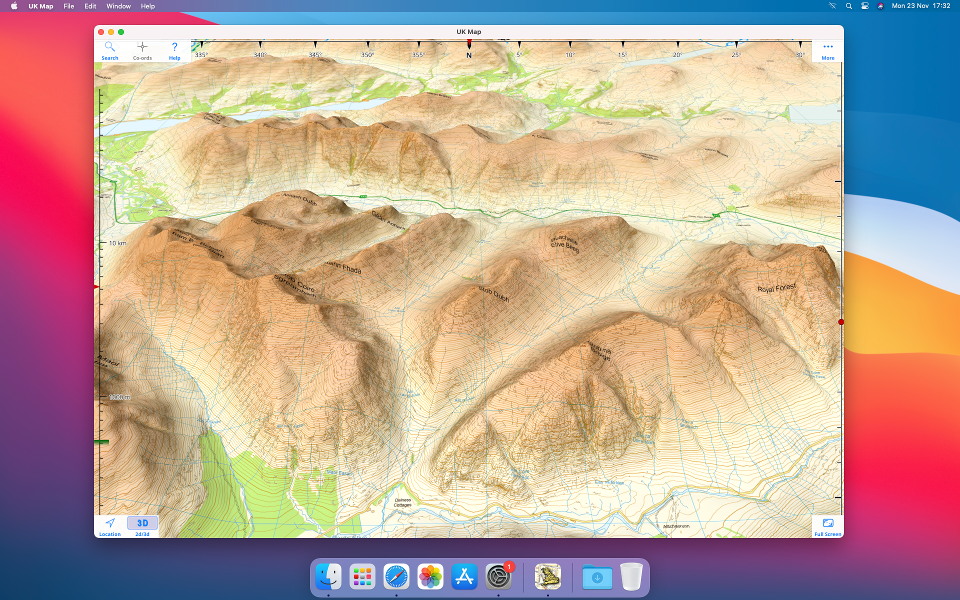
Apple recently launched new Macs that use an ARM processor, rather than the Intel processors in the previous models. Because this is the same kind of processor as the iPhone and iPad, it means that UK Map can run on these Macs! Here's a screenshot of UK Map running on my new ARM Mac mini:
13th November 2020
I've been contacted by a user who reports that they have problems when downloading the 1:10,000 Open Map Local maps (and only those maps); apparently one tile will download OK, but if they try to download more than one at a time, the other tiles fail.
I can't see anything wrong at the server end, which makes it very hard to debug. So if anyone else is seeing this problem, please get in touch.
1st September 2020
Since April, sales of UK Map and its in-app purchases to customers in the UK have been subject to Digital Services Tax. This new tax of 2% on sales is in addition to the 20% VAT that you already pay; the motivation seems to be based on the idea that "tech companies" like mine are not paying their fair share of tax. As you can imagine, this is a charge that I would dispute.
It is difficult for me to pass on small price changes of this sort because App Store prices are rounded to tiers, i.e. £0.99, £1.99, £2.99 etc. I will, however, be increasing some in-app-purchase prices soon, chosen in a way to cancel out the effect of the new tax on average over all purchases.
Updated 5th September: The new prices have gone into effect.
6th July 2020
Updated versions of the paid 1:10,000 city maps are now available, using the latest data from Ordnance Survey. The changes are minor in most places.
In addition, I have extended coverage to more cities - 83 new purchases are available, from Inverness to Dover. Updated 7th July: These have now been approved by Apple and should be available on the app's Map Store screen.
Please let me know if you spot any problems.
24th June 2020
Updated versions of the paid 1:50,000 maps are now available, using the latest data from Ordnance Survey.
Generally the changes are minor in most places, so I do not recommend updating areas unless you believe something significant has changed there.
Your app should notify you of the new maps soon, and you can then update areas by selecting 'Update' from the Map Management screen and selecting the area. These updates are available to everyone who has purchased the corresponding regions.
Please let me know if you spot any problems.
21st June 2020 (Updated)
I will be carrying out maintenance work on the servers that provide map downloads and this website over the next few days. If all goes according to plan, backup systems will ensure that downtimes are brief. But things don't always go according to plan: please excuse any problems, and sorry for the inconvenience.
Updated 24th June: I believe that the system is now running normally again. There was a period of a couple of minutes on Sunday afternoon when a few users may have received map tiles of the wrong scale: please get in touch if this has affected you.
25th May 2020
Updated versions of the free 1:25,000 and 1:10,000 maps are now available. These use the latest maps from Ordnance Survey and updated footpath data from OpenStreetMap.
Generally the changes are minor in most places, so I do not recommend updating areas unless you believe something significant has changed there.
Your app should notify you of the new maps soon, and you can then update areas by selecting 'Update' from the Map Management screen and selecting the area.
Please let me know if you spot any problems.
23rd May 2020
As part of the celebration of UK Map's 10th birthday, and knowing that many users will be spending more time sat at home rather than being out in the countryside, I offer a page of "hacks" to create GPX files for use with UK Map in interesting ways. See how to plan driving and hiking routes online and import the results into UK Map, how to create custom waypoint symbols, how to import bus routes from OpenStreetMap, and more. Read on.
13th April 2020
Monday 13th April 2020 marks a significant milestone for UK Map - it will be ten years since it first appeared on the App Store!
I had been considering some sort of celebration but the current situation has made that impossible. Perhaps I should make the 11th birthday a special celebration instead?
Interestingly, so far sales of UK Map have continued at about the same level as before the lockdown. Perhaps these are all people planning adventures for later in the year. So the business remains open for the time being. I may have to review this if things change over the next few months.
I know that many of the regular users of the app bought it several years ago. Whether or not you remember the early years of the app, do have a look at this look back at its evolution over the decade.
Thank you to everyone for your support over the years.
4th February 2020
A new version of UK Map has now been approved by Apple. This is a fairly minor update, primarily to attempt to resolve the issues with GPX file import described below. Please let me know if you see any changes with that.
Related to that, there is a new "Import File" option on the Files screen. This may make it possible for you to get GPX files into the app even when the other methods fail.
This update also adopts the iOS 13 "Dark Mode", with corresponding changes to the colour palette in "Light Mode". Note that only the user-interface elements have changed, not the maps themselves.
Do please let me know what you think, especially if you have any problems with the update.
7th December 2019
Several users have reported that they are unable to open GPX files from websites or other apps in UK Map since updating to iOS 13. This is due to changes in iOS, and affects many apps. A proper fix for this will require action from Apple, and there is a chance that they will resolve it in a future iOS update (or they may not).
Apple's advice to developers is that the problem only occurs when a user has multiple apps installed that each declare their support for GPX files in a slightly different way. So if UK Map is the only GPX-supporting app that you have installed, you shouldn't see a problem. Unfortunately there is no way for you (or me) to inspect how other apps declare their GPX support to determine which combinations are compatible and which are not.
Apple have proposed a standardised GPX code. If all apps used this same code then the problem would go away - but it's unlikely that every last app will be updated to do this. I will probably adopt this standard code in the next UK Map update, but currently I have some concerns that it is missing an important element and I am awaiting clarification of that aspect before releasing anything.
A related issue is that it has become somewhat more complicated to open files from websites in apps in iOS 13, and some users may simply be misled by that. The process is now as follows: after selecting a file to download from a web page you now need to touch a new button - a circle with an arrow pointing downwards - to view a list of downloads. Selecting the file from this list will show the source code of the GPX file; you can then touch a button with a square pointing upwards, and this should offer apps to open it in much like iOS 12 did.
So my advice is:
Sorry for the inconvenience.
26th August 2019
Northern Ireland has a separate mapping agency from Great Britain - Ordnance Survey Northern Ireland (OSNI). When Ordnance Survey (GB) released their first OpenData maps back in 2010 there was no corresponding release from OSNI, and so Northern Ireland was not covered by this app's free maps.
Since about 2017 some OpenData map data has been available from OSNI and I have been considering whether I should include it in the app. Frankly it is not as good as the GB data, and I don't know whether it would be very useful. A couple of examples follow; I would appreciate feedback from users about whether they would find it useful to have this available in UK Map.
Street maps are available for the centers of about 80 towns; here is an extract from the Belfast map:
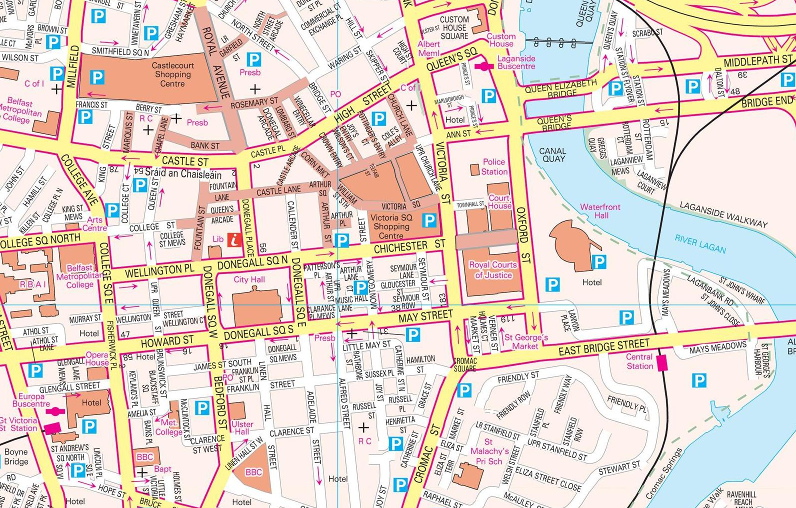
The whole of NI is also available in 1:10,000 mapping that looks like this:
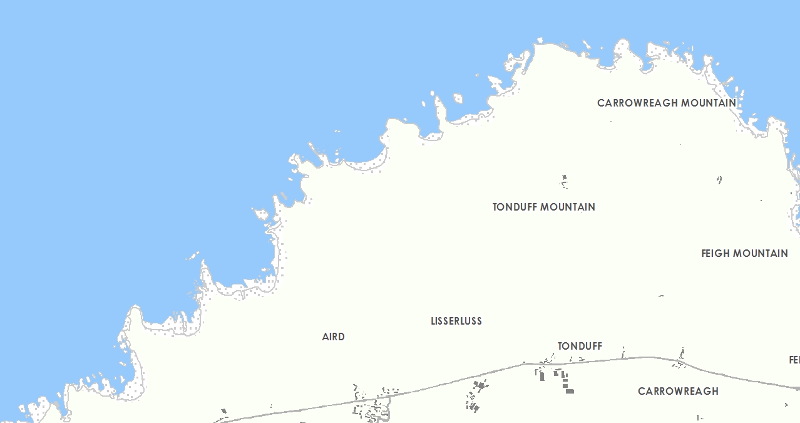
(That coastline includes the Giant's Causeway, believe it or not.)
One other important thing that they have released is their altitude data, which is available in a more detailed form than the OS product. That could be used to add contour lines to the other maps.
What do you think? My initial feeling is that most people would be better served by a good OpenStreetMap app than by these maps.
25th July 2019
This update adds a third scale of paid maps: 1:10,000 maps of selected cities, using Ordnance Survey Vector Map Local. Compared to the free 1:10,000 maps the first thing you'll notice is that these maps include more walls and hedges, making a very noticeable difference to the appearance of suburban back gardens. The resolution is also higher, and they also give names to more public buildings, particularly schools, and show more details such as paths in parks.
To get started I've made about 100 of these maps, each covering typically 10x10 km. Please check exactly what is covered by each map before purchase if particular suburbs are important to you. If you'd like to see more towns and cities covered by these maps, please get in touch with your suggestions.
This update also adds paid 1:50,000 maps of the Isle of Man.
Please get in touch if you find any bugs or have any problems updating. As always, if you're about to start a trip where you'll need the app I suggest NOT updating immediately, just to be safe.
7th July 2019
Today I'm excited to announce an update which I know many users have long been waiting for: you can now get paid Ordnance Survey 1:50,000 and 1:25,000 map that are just like the paper maps!
Rest assured that this is in addition to the free maps, which will remain available and continue to be updated. But if you really need the greater detail in the paid maps, now you can get it.
The easiest way to get the paid maps is just to do a "long touch" on the map, as usual, and then select one or other of the paid map scales. (To keep it simple, select a small area.) Alternatively there is a new "Map Store" button, under "More", which lists all of the individual purchases.
To learn more, the Help within the app has a new section about the paid maps, and there is a new page on this website with more information.
Note that this update requires iOS 12. This means that the iPhone 5 and older, the iPad 4th generation and older, the original iPad mini, and the iPod touch 5th generation and older, are no longer supported.
Do please get in touch if you have any problems, or other feedback, and please excuse me if something goes wrong!
1st July 2019
Some observant users may have seen a message in the app about new maps in the last few days, which is not specific about which of the three maps products have been updated. Please ignore this message; it is bogus, and the result of an unrelated change on the server that supplies the map data.
Sorry for any confusion.
18th June 2019
Apple have now approved the latest update to UK Map.
This is a minor update to fix a few bugs, hopefully including the issues described below with version 3.5. Please let me know if you find any other problems.
15th June 2019
There have been reports of a couple of issues with the new version 3.5:
There will be a minor update in due course to resolve these issues. If you have noticed any other problems with version 3.5, please get in touch as soon as possible.
Note that I have been able to understand the second issue, with photos, thanks to the anonymised crash reports that Apple send me. But these are only sent if you have enabled "Share With App Developers" in Settings -> Privacy -> Analytics, and only about 1 in 4 UK Map users allow this. Please consider turning this on!
Sorry for the inconvenience.
13th June 2019
Updated versions of the 1:25,000 and 1:10,000 maps are now available.
Generally the changes are minor in most places, so I do not recommend updating areas unless you believe something significant has changed there.
Your app should notify you of the new maps soon, and you can then update areas by selecting 'Update' from the Map Management screen and selecting the area.
Please let me know if you spot any problems.
13th June 2019
Apple have now approved the latest update to UK Map.
This update includes new features for creating routes within the app. You can either draw routes freehand (tap on the starting point, tap again to show the menu and choose DRAW) or build them within the Files screen using "New Route". You can then estimate times, based on Naismith's Rule or similar. See the new section "Drawing Routes" in the online user guide for details.
The user interface for invoking actions after selecting a point on the map has changed slightly in this version. Previously, buttons were shown at the bottom of the screen (iPhone) or below the selection box (iPad); now, a second tap on the selected point, or in the selection box, presents a more conventional menu of these actions.
The style selector has been upgraded and now shows colours and symbols more clearly than before. A motorbike symbol has been added.
And of course some bugs have been fixed, hopefully including the iPhone XS compatibility issue described below.
If you encounter any problems with this version, or have any other feedback, do please get in touch.
10th June 2019
I've had several reports over the last few months of compatibility problems with the iPhone XS Max. Unfortunately I was not able to reproduce the problem myself, which made it difficult to work out what was happening. Now, however, thanks to a clue from a user I have identified a likely cause. There will be an update in due course to resolve the problem but in the meantime here are two possible work-arounds:
If you're experiencing problems on the iPhone XS Max and you are not using zoomed mode, or if these work-arounds don't solve the problem for you, please get in touch.
Sorry for the inconvenience.
1st February 2019
I've written a new page about how to check that iCloud Backup is enabled for UK Map, and describing its limitations. Read more.
2nd September 2018
Apple recently announced that they now require all apps to have a privacy policy, so I've written one for UK Map. This wasn't difficult: we never have any personally-identifying information about our users, unless you email us, in which case we know your email address. That's unless you consider an IP address to be personally-identifying; it could identify you to "government agencies" (and probably Facebook), but not to me.
If you want to read it, the privacy policy is here.
2nd June 2018
Ordnance Survey have released updated versions of the 1:25,000 maps and they are now available in the app. The superimposed paths are the same as in the recent update to Open Map Local.
Generally the changes are minor in most places, so I do not recommend updating areas unless you believe something significant has changed there.
Your app should notify you of the new maps soon, and you can then update areas by selecting 'Update' from the Map Management screen and selecting the area.
Please let me know if you spot any problems.
27th April 2018
Updated versions of these 1:10,000 maps have been released by Ordnance Survey and are now available in the app. The superimposed paths from OpenStreetmap have also been updated.
Generally the changes are minor in most places, so I do not recommend updating areas unless you believe something significant has changed there.
Your app should notify you of the new maps soon, and you can then update areas by selecting 'Update' from the Map Management screen and selecting the area.
Please let me know if you spot any problems.
16th April 2018
Until now, UK Map has been listed in the app store as sold by "Philip Endecott". I have now established a limited company to operate through and the app store listing will now show the seller as "Mappendix Limited". Rest assured that this change will make little practical difference; it is still the same person doing the work.
3rd March 2018
Apple have now approved the latest update to the app.
In this update, I have added OS Open Map Local as an additional 1:10,000 map which you can use as well as or in place of the existing OS Street View maps.
See the Maps page for examples and comparisons of the two 1:10,000 map types. Also see my post from July 2017, further down this page, for more comparisons.
When you select an area to download maps, you'll now be offered three map types of which you can select any combination. In the Map Management screen, the map overlay now uses stripes to indicate areas where more than one type of map is installed.
If you download both types of 1:10,000 map for the same area, which one is displayed is determined by a new settings switch.
Note that Ordnance Survey are due to release a new version of Open Map Local in April, and a new version of VectorMap District in May. I suggest that most users should wait for these versions before updating large numbers of maps.
Note that versions of the app prior to version 3.4 will continue to work and will continue to be able to download maps - but in future the maps that they can download will not receive further updates.
As usual your feedback would be appreciated.
2nd March 2018
As previously announced, I have today discontinued map downloads for versions of the app prior to version 2.0, from 2011.
6th February 2018
This is a minor update which I hope will resolve the problems with photos that many users have seen in version 3.2. The app now tries to display more of your photos, including those that are stored in iCloud.
Please let me know if you continue to have any trouble with photos, or if you find any new problems.
29th January 2018
A few people have emailed to tell me that the new photos feature in version 3.2 is not working for them. There seem to be two issues:
My suspicion is that the crashes may be related to a new image file format called HEIF that Apple uses on newer devices instead of JPEG. The affected devices are the iPhone 7 or 7 Plus and newer, and the iPad Pro 10.5 inch and iPad Pro 12.9 inch 2nd generation - but only when they're running iOS 11. It would be great to know if this agrees with what users are seeing.
I don't yet have much idea about the second problem, except to reiterate that the app can only show photos if they include location information and they are actually stored on the device, not in iCloud.
There will be a further update eventually to resolve these issues.
There have also been further server problems, resulting in map download errors, since Sunday. Sorry for the inconvenience; ironically, I was making changes intended to increase the system's reliability when I triggered the latest problem. Due to the nature of the error it may take up to 48 hours, i.e. until the middle of Tuesday, before map downloads are working for everybody - though I believe the vast majority of users will not have waited anything like that long. Please get in touch if you're still having trouble with map downloads on Tuesday evening or later.
27th January 2018
In this update:
As ever, your feedback about the new version would be appreciated.
27th January 2018
This announcement affects only the very small number of people who are still using versions of the app prior to version 2.0, which was released in 2011.
Map downloads for these very old versions of the app will be discontinued sometime after 1st March 2018. The app will continue to function with the maps that have already been downloaded, but further downloads will fail.
Please get in touch if you have any concerns about this.
26th January 2018
The server that provides map downloads and this website was down for a while this afternoon. It should be functioning normally now; if you can read this but still can't download maps, please get in touch.
The root cause was that at around 12:30 I attempted to restart the server, expecting only a couple of minutes downtime, but discovered too late that it this would involve an enormously slow save-and-restore process. I enabled a backup system to provide map downloads, though it will have taken a while for users to benefit from this due to internet caching issues. The main server was back online around 18:30.
Sorry for the inconvenience. I'll be spending the weekend working out how I can avoid this happening again - it could easily have been a lot worse than it was.
22nd January 2018
I'm currently preparing the next, fairly minor, update to UK Map.
One issue is compatibility with the iPhone X and its "notch" at the top of the screen. Normally I buy a new device for testing each time something as significant as the screen size changes, but I'm trying to avoid doing that this time (££££!). So if there are any iPhone X owners reading this, please get in touch!
Thanks in advance.
6th August 2017
In this update:
The app should notify you that the new edition is available soon. In 2D mode, if you touch "More" and then "Map Management" and select "Update", you can select areas of existing maps to replace with the new edition. The coloured overlay will indicate which tiles have and haven't been updated.
Generally the changes are minor in most places, so I do not recommend updating areas unless you believe something significant has changed there.
Note also that the new maps are coming from a new server; if you notice any changes to download speed or reliability, please let me know.
5th August 2017
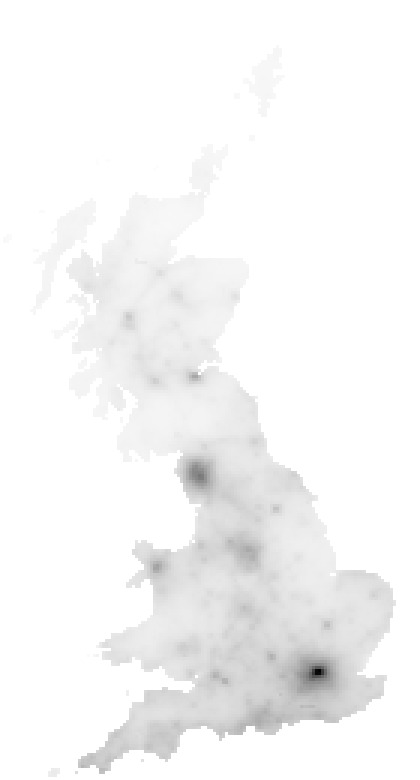
You might be interested in the following map, which shows how often each map tile has been downloaded. London is most popular, followed by the Lake District. Other cities that stand out include Bristol, Bath, Oxford, Cambridge and Norwich making an almost straight line across southern England. Snowdonia and the Peak District are popular, and you can also identify the Yorkshire Dales, the Brecon Beacons and Dartmoor. The coast of the South West of England and the New Forest are also popular. In Scotland the hot-spots include Edinburgh, Glen Nevis and Glencoe; the route of the West Highland Way can just about be made out.
For me, it's interesting to know the balance between countryside and urban use of the app - see my message below about Open Map Local.
4th August 2017
I've updated the altitude data that the app downloads along with the map tiles to support the 3D mode and altitude display.
Altitude data does not change much from year to year so you probably won't spot any differences - unless they are due to bugs, in which case please let me know.
The contour lines will use this new data when the maps are next updated - see the news item below for more about that.
Update: I believe that the issue with some zero-altitude tiles in coastal areas is now fixed. If you get any download errors please let me know.
21st July 2017
The app currently uses an Ordnance Survey product called "Street View" for its 1:10,000 maps. Ordnance Survey discontinued this earlier this year, and are now offering something called "Open Map Local" as a replacement.
Superficially, Open Map Local and Street View look similar - but as I've looked more closely I've found that the new product has some deficiencies. In particular, it lacks names for important public buildings that were shown in the old maps.
Here are a couple of examples. First, here's an area of central London as depicted by Street View, followed by the same area as shown in the new Open Map Local:
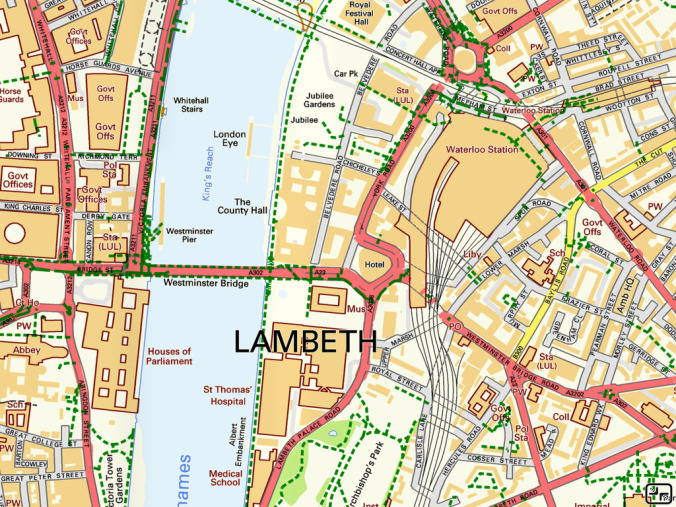
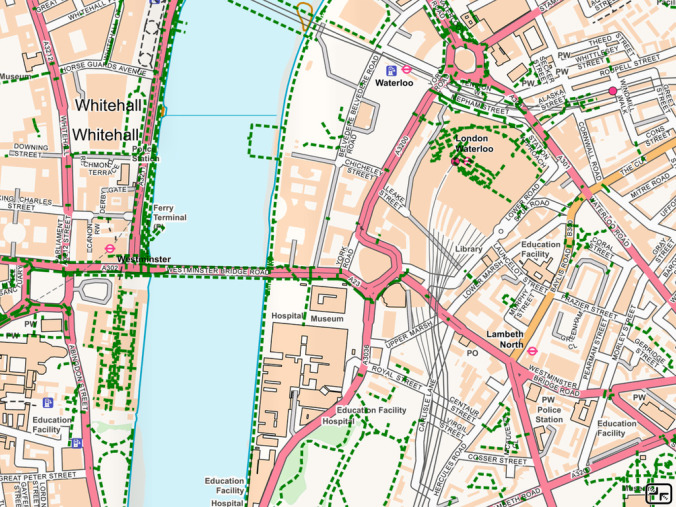
Don't worry about the pale colour scheme; I can tweak that. But do notice that the Houses of Parliament, County Hall, St Thomas' Hospital and the London Eye are all named on the old map but not on the new one.
It's not only the centre of London that's affected; here is an area of south Manchester:
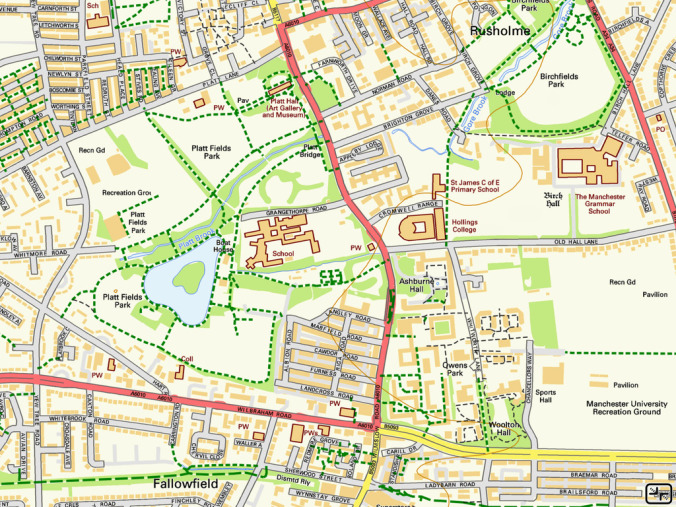
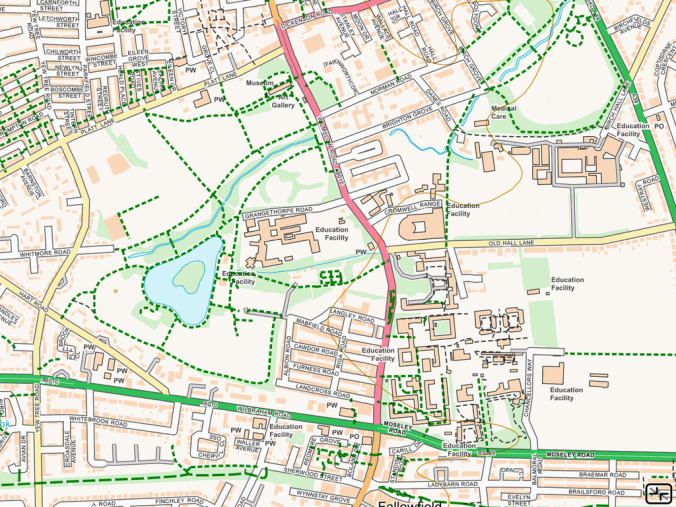
"Platt Hall", "Platt Fields Park", "Ashbourne Hall", "The Manchester Grammar School" and numerous other places have lost their names, in many cases now simply being labelled "Education Facility".
I'm not sure what I should do with this, and would appreciate feedback from users. I am tempted to continue to use the old Street View product for the time being, combined with the latest 1:25,000 maps and OpenStreetMap footpaths; Street View is only a year old, and only a few new roads will have changed since then. And perhaps the next updates of Open Map Local will be an improvement on this first edition. Let me know what you think.
16th July 2017
This is a minor update which I hope will resolve the crashes on startup that have been reported by some users. Please let me know if you still have problems.
13th July 2017
A couple of users have reported that version 3.0 crashes on startup.
I think I've identified the cause and there will be an update to resolve this soon. In the meantime, note that deleting and re-installing the app will probably fix the problem - though that will lose all of your maps, so I only recommend it if you have relatively few maps installed.
If you have spotted any other problems in version 3.0, please let me know as soon as possible.
Sorry for the inconvenience.
11th July 2017
I'm happy to announce that UK Map version 3.0 is now available. As usual, this is a free update for all existing owners.
This is a major update to the app. If you're about to depart on a wild trip and rely on the app, you might prefer to wait until any "dust has settled" before you update.
New features in this update include:
The detailed maps are unchanged, and your existing downloaded maps should still be accessible after the update.
This update has to drop compatibility with some older devices, specifically those that cannot run iOS version 8 or newer. Sorry about that. This is necessary to comply with Apple's requirement for 64-bit support.
If you've used the previous versions of the app you should find that most of the major features are still recognisable - but please review the online help (touch the ? button) to learn about what's new.
As ever, your feedback would be very much appreciated.
22nd April 2017
I've been receiving a lot of emails about a message from Apple complaining that this app "needs to be updated" and "may slow down your iPhone".
There will be an update when necessary to avoid Apple stopping the app from working when they make an update to iOS. This will not make anything go any faster, however.
Even so, my advice is to be cautious about applying major iOS updates until you've verified which apps are broken by them.
20th June 2016
In this update:
The app should notify you that the new edition is available soon. In 2D mode, if you touch the Maps button (the rightmost one of the buttons at the bottom of the screen) and select "Update", you can select areas of existing maps to replace with the new edition. The coloured overlay will indicate which tiles have and haven't been updated.
Please let us know if you find any glitches or have any other comments about the new maps.
1st June 2015
In this update:
The app should notify you that the new edition is available soon. In 2D mode, if you touch the Maps button (the rightmost one of the buttons at the bottom of the screen) and select "Update", you can select areas of existing maps to replace with the new edition. The coloured overlay will indicate which tiles have and haven't been updated.
Please let us know if you find any glitches or have any other comments about the new maps.
3rd November 2014
An update to UK Map has now been approved by Apple. This update is only to resolve the compatibility issues with the new iPad Air 2. If you don't have an iPad Air 2, there is no need to install this version.
23rd October 2014
Unfortunately UK Map fails to start or crashes soon after starting on the new iPad Air 2.
I've now obtained one of these devices and have found the cause of the crash: this is the first iOS device with three processor cores. Now that I know that I should have a fix in the next few days.
Sorry for the inconvenience.
8th October 2014
Apple have approved the latest update to UK Map. This update is primarily for compatibility with the iPhone 6 and iPhone 6+, and includes some further minor changes for iOS 8.
It also includes updated versions of the 1:1,000,000 and 1:250,000 road maps and the search data, from Ordnance Survey.
I would appreciate any feedback about how well this version does or doesn't work for you. I would particularly appreciate feedback if you have an iPhone 6: I have bought an iPhone 6+ for testing but I don't have my own iPhone 6.
15th September 2014
Updated 25th September Apple have approved an update to UK Map for iOS 8 compatibility. Ideally you should install this update to the app before updating to iOS 8, but it will probably work if you do it in the other order. Feedback suggests that this version works as intended; if you have any problems during or after updating please get in touch.
Another update will follow in a few weeks to add support for the new iPhone 6 and 6+. The current version will work on those devices in a compatibility mode, with a zoomed version of the iPhone 5 screen.
7th September 2014
I am always surprised by the way that people will update software without considering the possibility that something will go wrong...
With that in mind, I'd like to encourage users of UK Map to not update to iOS 8, which is due out sometime soon, without first checking whether there are compatibility problems with this or other apps. I'll post an update here when I know what the status is.
4th June 2014
In this update:
The app should notify you that the new edition is available soon. In 2D mode, if you touch the Maps button (the rightmost one of the buttons at the bottom of the screen) and select "Update", you can select areas of existing maps to replace with the new edition. The coloured overlay will indicate which tiles have and haven't been updated.
Please let us know if you find any glitches or have any other comments about the new maps.
23rd October 2013
Updates in this version include:
Please get in touch if you have any trouble with the new version.
26th September 2013
I have become aware of an iOS 7 compatibility issue that is affecting some users.
The app has a "safe mode" in which it tries to recover when starting up after a previous crash. On iOS 7, this mode doesn't work and the app crashes immediately as it starts.
If you're using iOS 7 and you find that the app crashes immediately on starting, please go to the main Settings app, scroll down to find UK Map, and turn OFF "Start in Safe Mode". Then restart the app.
Please get in touch if this doesn't resolve your problems.
There will eventually be an update to resolve this. If you find any other iOS 7 issues that need to be fixed at the same time, please let me know.
22nd July 2013
In this update:
Note that the base 1:25,000 maps have not changed in this update.
The app should notify you that the new edition is available soon. In 2D mode, if you touch the Maps button (the rightmost one of the buttons at the bottom of the screen) and select "Update", you can select areas of existing maps to replace with the new edition. The coloured overlay will indicate which tiles have and haven't been updated. Note, however, that this procedure will not replace the altitude data that's used for the 3D mode: to replace this, you need to delete and re-download the map tiles.
Please let us know if you find any glitches or have any other comments about the new maps.
12th April 2013
In this update:
Note that the 1:10,000 maps have not changed in this update.
The app should notify you that the new edition is available soon. In 2D mode, if you touch the Maps button (the rightmost one of the buttons at the bottom of the screen) and select "Update", you can select areas of existing maps to replace with the new edition. The coloured overlay will indicate which tiles have and haven't been updated.
Please let us know if you find any glitches or have any other comments about the new maps.
15th February 2013
Updated versions of the detailed maps are available. In this update:
The app should notify you that the new edition is available soon. In 2D mode, if you touch the Maps button (the rightmost one of the buttons at the bottom of the screen) and select "Update", you can select areas of existing maps to replace with the new edition. The coloured overlay will indicate which tiles have and haven't been updated.
Please let us know if you find any glitches or have any other comments about the new maps.
14th February 2013
Updates in this version include:
The iPhone 3G and the 2nd generation iPod touch are no longer supported, but note that the previous version of the app will continue to work and be able to download maps.
20th May 2012
Updated versions of the detailed maps are available. The changes include:
The app should notify you that the new edition is available soon. In 2D mode, if you touch the Maps button (the rightmost one of the buttons at the bottom of the screen) and select "Update", you can select areas of existing maps to replace with the new edition. The coloured overlay will indicate which tiles have and haven't been updated.
Please let us know if you find any glitches or have any other comments about the new maps.
2nd December 2011
This update makes the following changes:
17th May 2011
This update has now been approved by Apple. It should fix a number of crashes and freezes that have been reported on various device.
25th April 2011
This update, which fixes a bug that could cause the app to freeze on the iPad 2, has now been approved by Apple.
20th April 2011
I believe that I've now identified the cause of the freezes that some users have reported on the iPad 2, and I've submitted a fixed version to Apple. Hopefully they will approve this soon.
If you don't have an iPad 2, there is no need to update from 2.0 to 2.0.2.
18th April 2011
Updated versions of the detailed maps are available. These use revised versions of the Ordnance Survey base maps and OpenStreetMap footpath overlays.
The appearance of the 1:10,000 maps has not changed in this update, but the 1:25,000 maps have been revised. The new versions have slightly more detailed building outlines, use a distinct colour for the foreshore, and have removed the blue symbols for schools that were used in the previous versions. Most obvious is a change in the colour scheme; the Ordnance Survey data has a very pale appearance which you can see in their online viewer. I have increased the contrast and shifted the colour balance to make the background, text, and in particular minor roads more visible. Another effect of this shift has been to make the crag and rock textures more prominent.
The app should notify you that the new edition is available soon. In 2D mode, if you touch the Maps button (the rightmost one of the buttons at the bottom of the screen) and select "Update", you can select areas of existing maps to replace with the new edition. The coloured overlay will indicate which tiles have and haven't been updated.
Please let me know if you have any feedback about the new maps.
11th April 2011
I'm pleased to announce that UK Map version 2.0 has just been approved by Apple.
This is a major update that adds a 3D mode. As well as this new feature, much of the existing functionality has been re-implemented for improved speed and appearance.
If you currently have an earlier version of UK Map, when you first run the app after upgrading to version 2.0 it will download a small amount of 3D data for each of your existing map tiles. This will take less than one second per tile using a typical WiFi network. In testing, sometimes the download had completed before the user had acknowledged the informational alert that is shown when it starts. You can check whether there are any tiles for which the 3D data has not been downloaded by touching the new "maps" button (in 2D mode only, it is the rightmost of the buttons at the bottom of the screen) and looking for tiles that are coloured black.
Because much of the app has changed in this update it is quite possible that some new bugs will have been introduced. Do please get in touch if you encounter any problems.
One user has reported that the app freezes on an iPad 2 after upgrading; if you have a large number of maps already installed and you have an iPad 2 (or possibly iPad 1) you might like to wait for clarification before upgrading. If you don't already have large numbers of maps installed, I suggest upgrading anyway; if you encounter any problems you will probably be able to simply delete and re-install your maps to resolve it.
Note that a new edition of the detailed maps will be available soon; you may prefer to wait before installing large numbers of maps. The new app will inform you when the new maps are available.
With the release of this update, the iOS version of the 3D Lake District app has been withdrawn. This app was intended as a demonstrator of the 3D functionality that is now included in the main UK Map app; it used an early version of this code which suffered various issues with newer versions of iOS.
22nd January 2011
A new Android app, "UK Map 3D", is now available.
This app has different functionality than the iPhone/iPad app: it doesn't have the detailed 1:25,000 and 1:10,000 maps, but it does have a 3D mode.
Feedback about device compatibility would be very much appreciated; there are lots of Android devices on the market, all slightly different, and I've not been able to test on many of them.
8th December 2010
The Android version of the 3D Lake District app is now available from the Android Market.
Note that the app has limited hardware compatibility, depending on the device's 3D graphics chip. Your feedback about which devices do or don't work will be much appreciated, as we've not been able to test on many devices ourselves.
26th November 2010
There will soon be an Android version of the 3D Lake District app, and I'm looking for people to help test it. If you have an Android phone or tablet and would like to help, please get in touch.
18th - 21st November 2010
I'm going to be in Kendal this weekend demonstrating UK Map, 3D Lake District and my other apps in the trade tent at the Mountain Festival. You'll also be able to get a "sneak peek" of my next project. If you're going to be in the area, do please come along and say hello. If you've never been to the festival I can thoroughly recommend it - a packed weekend of films and lectures, all excellent. No armchair mountaineer should miss it!
8th November 2010
The next major update to UK Map will feature a dramatic new feature - 3D maps! To give a taste of what's coming, a new app, "3D Lake District", is now available. This contains 1:25,000 maps covering the Lake District National Park, using the same OS OpenData and OpenStreetMap footpaths as UK Map. It's available now and costs only £1.19.
13th September 2010
This version, which may be called 1.2.1 or 1.2.2 depending on where you look, is primarily a bug fix release. It should resolve some crashes that can occur if map or other data has been corrupted for some reason, and a bug that made maps uninstallable after a large area had been selected. It does not fix the issue with the layer selection switches described below.
It also makes minor changes to avoid confusion when "map info" is enabled unintentionally or when the GPS has been turned off.
8th September 2010
A nasty bug has been detected in the way that the layer selection switches work. If you touch the switches too quickly, you can end up in a state where the 1:25,000 switch is OFF and the 1:10,000 switch is ON. Once in this state, both switches are disabled and neither layer of maps is displayed.
If you find yourself in this state, you can reset the switches as follows:
This will reset the map layer switches and shading settings, but won't erase any maps or anything like that.
Please get in touch if you have any problems with this.
23rd July 2010
This update adds important new features and fixes compatibility with the iPhone 4 and iOS 4.0.
The main new feature is the addition of 1:25,000 maps as an intermediate step between the 1:250,000 road atlas mapping and the 1:10,000 street maps. When you install maps you can now choose to install only 1:25,000 or both 1:25,000 and 1:10,000. If you install only 1:25,000 you can later upgrade the map to include 1:10,000 as well.
The maps also now include footpaths. These are not included in any of the OS data, so instead they come from OpenStreetMap. Since OpenStreetMap is a volunteer project the coverage of this data is not complete, but it is good in many areas.
Other new features include:
24th June 2010
Good news and bad news. Bad news first: it seems that the app does not work correctly on the new iPhone 4, due to its high-resolution screen. This will be resolved in a future update; I don't yet have a timescale for when that will be available.
The good news is that apparently when the app runs on an iPhone 3GS with iOS 4.0, the compass-crash problem is cured.
31st May 2010
Version 1.1.1 of the app is now available as a free upgrade from the App Store. This update fixes a bug that only affected the iPad and caused it to crash on startup.
If you don't have an iPad and are currently running version 1.1, there is no need to upgrade to this version.
18th May 2010
Version 1.1 of the app is now available as a free upgrade from the App Store. However, if you already have version 1.0 installed, please read the following before upgrading:
The main new feature is the addition of contour lines and hill shading to the street maps. This makes them much more useful for countryside navigation.
The 3D hill shading effect can be controlled from the new settings screen, which is accessed via a new button with a "map and gear" symbol at the bottom of the screen. You can change the strength of the slope shading and the direction of the simulated sunlight, and turn the height tinting on and off. Note that when this effect is not useful, e.g. for urban navigation, you might prefer to turn it off as that will make map display slightly quicker.
There is also a co-ordinate display at the top of the screen, which is enabled by touching the arrow button at the top right. The format of the co-ordinates can be changed via the new settings screen.
In addition, you can now search for postcodes and road numbers. Postcodes down to the sector level (e.g. "M14 6") are built in to the app, and the more detailed postcodes are downloaded with the street maps. Note that you must type the space in the middle of the code when searching. Road numbers (e.g. A1304) are only included in the street maps, not the built-in national maps.
Finally, if your device has a compass (i.e. the iPhone 3GS and iPad), a new button allows you to rotate the map to face North.